
Omnipod 5
Insulet CorporationMedical
3.5990.00 Reviews
- Version
- 4.0.2
- Installs
- 100.00K
- Age Rating
- Everyone
Screenshots

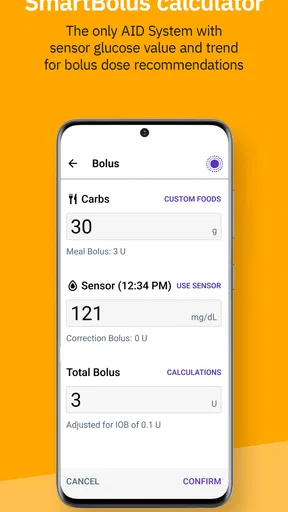
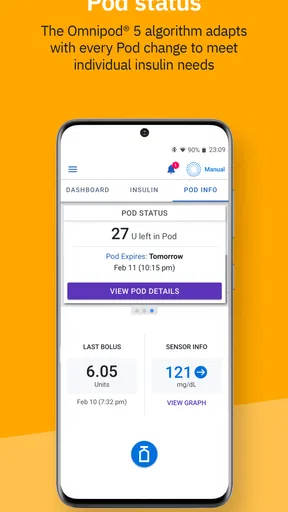
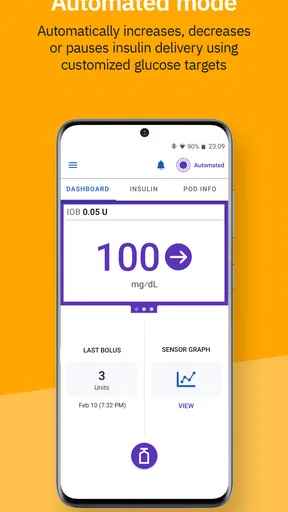
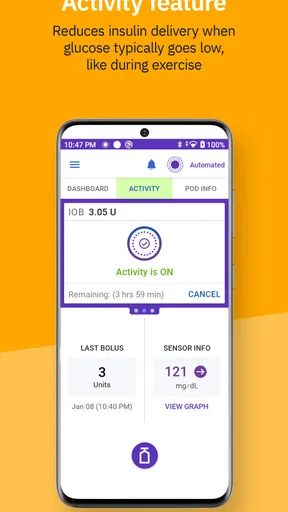

Our Review of Omnipod 5
 Analysis by Appyee
If you are looking at Omnipod 5 for the first time, the most important thing to understand is that this is not a general diabetes diary or a simple dose calculator. It is the companion app for the Omnipod 5 Automated Insulin Delivery System, a medical tool from Insulet Corporation. I found that distinction useful before even opening it, because the app makes the most sense when you already have the prescribed Omnipod 5 supplies, clinical guidance, and a clear plan for using them.
The app is free and aimed at everyone from an age-rating perspective, but its subject matter is serious. I would not treat it like an ordinary wellness download. It belongs in the category of tools where careful setup, consistent habits, and communication with a diabetes care team matter more than a polished first impression. Used in that context, it can become a practical part of daily insulin management rather than another screen to check.
What the first-time experience is really like
On the surface, the store summary is brief: Omnipod 5 Automated Insulin Delivery System. In practice, that means the app sits inside a larger treatment workflow. It is not something I would install casually just to explore. A person considering it should first confirm that the app is intended for their Omnipod 5 arrangement and that their phone meets the stated minimum of Android 8.0 or a compatible supported device environment.
The current version is 4.0.2, and the application has passed the early-adoption stage: it has more than one hundred thousand installs, with an average rating of about 3.5 from roughly one thousand ratings. Those figures suggest a mixed but substantial user experience rather than universal approval. I would read that as a reason to approach the app thoughtfully, not as a reason to dismiss it. Medical apps often feel very different depending on the user's device, routine, training, and expectations.
My strongest advice is to separate “learning the interface” from “making treatment decisions.” You can become familiar with where information appears and how the workflow is organized, but insulin settings and therapy changes should come from the instructions provided by your healthcare professional. The app may help carry out an established plan; it should not replace the person responsible for helping you create that plan.
That distinction also explains who will benefit most. Someone already beginning Omnipod 5 with support can use the app as a central daily control point. Someone searching for a standalone way to estimate insulin, record meals, or monitor glucose without the Omnipod 5 system is likely looking at the wrong product. In that situation, a conventional diabetes logbook or a glucose-monitoring app may be a better fit.
Before installing, prepare the parts that matter
A smoother start depends less on tapping through screens and more on having the right information nearby. I would have the instructions from the diabetes care team available, make sure the phone is charged, and avoid beginning setup during a rushed commute, a busy work shift, or a moment when you cannot concentrate. The first meaningful success is not simply opening the app; it is reaching a point where you understand what the app is asking and can continue safely.
It is also worth deciding where the app belongs in your daily routine. If your phone is usually on silent, left in another room, or frequently replaced with another device, that habit deserves attention before relying on it. A medical control app needs a dependable place in your routine. Keeping the phone accessible and maintaining a backup plan for situations where it is unavailable is sensible, especially when your treatment depends on more than one connected component.
I would not rush past warnings or instructional screens just because the language seems familiar. In this kind of app, a small misunderstanding can have a larger consequence than it would in a calendar or fitness tracker. Read each prompt as part of the setup, and pause whenever the requested action does not match what your care team taught you.
Setting up without turning it into a guessing game
The first setup should be treated as a guided clinical workflow, not an experiment. Follow the official instructions for your Omnipod 5 system and use only the values and choices you have been given. If the app asks for information that you do not recognize, guessing is the wrong shortcut. Write down the question and ask your diabetes care team or consult the official support material instead.
One useful habit is to keep a small setup checklist outside the app. I would note whether the phone is the intended controller, whether the relevant supplies are ready, and which parts of the process have already been completed. This prevents a common first-time problem: assuming that an on-screen confirmation means every physical step has also been completed. An app can show progress, but it cannot remove the need to handle the associated medical equipment correctly.
Another practical tip is to avoid changing several variables at once while learning. If you are also changing your phone, your routine, your meal timing, and your treatment instructions, it becomes difficult to understand what caused a problem. Keeping the first few sessions as predictable as possible makes it easier to notice whether the difficulty comes from the app workflow, the surrounding equipment, or an everyday habit.
The app is free, which removes a financial barrier to downloading it, but “free” does not mean the complete treatment experience has no practical costs. You still need the appropriate Omnipod 5 system, supplies, training, and clinical support. I would therefore judge the app as one part of a medical setup, not as a free replacement for the system itself.
The first successful action should be deliberately simple
For a new user, success should mean completing one ordinary, well-understood task with confidence. That might be reviewing the current status presented by the system, following a familiar guided action, or completing a routine step that your care team has already explained. I would not use the first session to test the limits of automation or to improvise a new approach to dosing.
After completing that first action, stop and check your understanding. Ask yourself what the app confirmed, what still requires attention, and which part of the process happened outside the phone. This pause is valuable because the app is only one layer of the experience. The physical pod, the phone, the user's body, and the care plan all remain relevant.
A realistic everyday scenario would be a person preparing for a normal school or workday. Before leaving home, they open the app in a calm setting, review the information they already know how to interpret, and complete the routine step they have been trained to perform. Instead of trying to learn during lunch or while rushing between appointments, they use the app as part of a planned check-in. That small change in timing can make the experience feel far less intimidating.
I also recommend making a habit of noticing the difference between an instruction, a status message, and an alert. New users can read all three as if they demand the same response, which creates unnecessary stress. An instruction may require an action, a status may simply describe the current state, and an alert may need prompt attention. When you are unsure which is which, follow the official guidance rather than relying on intuition.
Where the app can feel confusing
The biggest source of friction is that a phone screen can make a complex treatment system look simpler than it is. A clean interface may give the impression that every situation has an obvious one-tap answer. That is not how diabetes management works. The app can organize the interaction, but it cannot interpret every real-life factor for you, such as illness, unusual activity, missed routines, or an unexpected reading.
Another point of confusion is responsibility. A user may assume that because the system is described as automated, they no longer need to pay attention. I would resist that assumption. Automation can reduce some repetitive work, but it does not make personal awareness, prescribed instructions, or backup planning irrelevant. The app is most reassuring when it supports an informed routine, not when it encourages someone to stop thinking about their treatment.
Phone behavior can create its own problems. A low battery, an unfamiliar device, or a change in how you carry the phone can interrupt a routine even when the app itself has not changed. I would keep the app on the phone you actually intend to use, avoid treating it as something to move casually between devices, and read any system message carefully before assuming it is harmless.
For the same reason, I would not compare this app with a typical food tracker on the basis of convenience alone. A food tracker may offer broader logging and flexible lifestyle notes, while Omnipod 5 is designed around a specific insulin delivery system. The former can be easier for general record keeping; the latter is more relevant when your priority is interacting with the Omnipod 5 workflow. Choosing between them depends on whether you need treatment-system control or general health journaling.
Three habits that make the experience safer and clearer
- Use a pause-and-confirm routine. Before acting on an unfamiliar prompt, read it twice, compare it with your training, and ask for help if the wording or requested step does not make sense.
- Separate phone checks from treatment interpretation. Open the app to follow your established workflow, but do not turn an unfamiliar screen into a reason to invent a new dosing decision.
- Keep a practical backup mindset. Know what you will do if your phone is unavailable or the normal workflow is interrupted, and keep that plan aligned with your healthcare professional's instructions.
These habits are more useful than trying to memorize every screen. Interfaces can change, and people use different treatment plans, but a careful pause, a clear division of responsibilities, and a backup plan remain valuable. They also reduce the chance that a user will confuse convenience with certainty.
Who should use it, and who should choose something else
I see the app as a strong match for someone who is starting or already using the Omnipod 5 Automated Insulin Delivery System and wants the related phone-based workflow in one place. It is especially suitable for a first-time user who is willing to learn gradually, follow professional instructions, and build regular check-ins into the day.
It is less suitable for someone who wants an independent diabetes journal, a broad nutrition planner, or a general glucose dashboard without the Omnipod 5 system. It is also not the right choice for a person who expects the app to make every treatment decision without supervision. In those cases, a different medical app or a conventional monitoring method may better match the actual need.
Caregivers and family members should also think about the user's independence and routine before assuming that a phone app will simplify everything. A system can be technically capable yet still feel difficult if the person using it is uncomfortable with phone prompts, frequently forgets the device, or lacks access to timely clinical guidance. The best choice is the one that fits the real household routine, not merely the one with the most appealing description.
How it compares with familiar alternatives
Compared with paper records, the app offers a more direct connection to the Omnipod 5 workflow, which can make routine actions feel more centralized. Paper can still be useful as a backup for notes and questions, especially when preparing for an appointment, but it does not provide the same system-specific interaction.
Compared with a standard diabetes logbook app, Omnipod 5 is narrower and more specialized. A logbook may be preferable if your main goal is to record meals, symptoms, exercise, or readings across different devices and treatment methods. This app makes more sense when your central question is how to work with the Omnipod 5 system itself.
Compared with manual insulin management, the appeal is the possibility of a more integrated routine rather than repeatedly handling every step in isolation. The trade-off is that you must learn the app, understand the surrounding equipment, and remain attentive to alerts and instructions. Manual methods can feel more familiar to some people, while this approach may feel more organized to others. Neither preference should override the treatment plan agreed with a clinician.
My practical verdict after looking at the complete workflow
My opinion is that Omnipod 5 is best understood as a focused medical companion, not a general-purpose health app. Its value comes from fitting into a specific insulin delivery system and helping the user carry out a trained routine through a phone. That focus is its strength, but it is also the reason I would not recommend installing it without the corresponding system and support.
The 3.5 average rating shows that the experience is not perfect for everyone, and I can understand why a medical app may generate frustration when setup, phone behavior, equipment, and personal expectations all meet at once. Still, a mixed rating does not tell me that the app is useless. It tells me that first-time users should plan the transition, keep expectations realistic, and avoid treating the app as a substitute for instruction.
If I were helping a friend begin, I would suggest installing it when they have enough time to concentrate, completing setup alongside the official training, and choosing one familiar action as the first milestone. I would also encourage them to write down confusing prompts instead of guessing, keep a backup plan, and bring questions to their care team. That path is slower than tapping through everything in one sitting, but it is much more reassuring.
For people who already use Omnipod 5 and want its phone-based control experience, the app is worth considering because it is free, current, and purpose-built for that system. For people looking for a standalone tracker or a general diabetes companion, I would choose a different category of app. The right decision comes down to one question: do you need to work with Omnipod 5, or do you simply need to record and understand diabetes information? Once that is clear, the app's role becomes much easier to judge.
Verdict
Strengths of Omnipod 5
- Automated insulin delivery can reduce the need for frequent manual adjustments.
- Tubeless design avoids tubing snagging on clothing or during daily activities.
- Pod changes are relatively quick and can be done without syringes.
- Glucose data and insulin information are easy to review in the app.
- Useful alerts can warn about highs, lows, pod expiration, and delivery issues.
Limitations of Omnipod 5
- Requires compatible hardware and a prescription from a healthcare professional.
- Pods are disposable, which can make long-term treatment expensive.
- Bluetooth or phone problems may limit app control and data synchronization.
- Adhesive may irritate sensitive skin or fail during heat, sweat, or swimming.
- Initial setup and automated settings can take time to understand safely.
Similar Picks in This Category
View All
WebMD: Symptom Checker
WebMD, LLC4.1

Microphone Amplifier
DOSA Apps4.2

Anatomy Learning - 3D Anatomy
3D Medical OU4.5

Period Tracker and Calendar
SimpleInnovation4.9

GoodRx: Prescription Coupons
GoodRx4.8

CVS Health
CVS Pharmacy4.5
Frequently Asked Questions
What is Omnipod 5, and how does the app work?
Omnipod 5 is an automated insulin delivery system designed for people with diabetes who use compatible Omnipod pods and a compatible continuous glucose monitor, such as Dexcom G6 or other supported sensors depending on the region and current software version. The app helps users start and manage pods, view glucose information, deliver insulin, and adjust settings. It is a medical tool, not a general fitness app, so setup and daily use require careful attention to training and approved instructions.
Is Omnipod 5 compatible with my phone and glucose monitor?
Compatibility is one of the most important things to check before downloading Omnipod 5. The app does not work with every Android or iPhone model, operating-system version, or glucose sensor. Supported devices and features can vary by country and may change after updates. Before installation, review the official compatibility list from Insulet and confirm that your phone, operating system, transmitter or sensor, and Omnipod 5 system are supported. Using an unsupported device may prevent important functions from working correctly.
Can Omnipod 5 automatically adjust insulin, and can I still control delivery manually?
Omnipod 5 can automatically adjust insulin delivery when it is operating in its automated mode and receiving valid glucose readings from a compatible continuous glucose monitor. Users can also deliver meal or correction boluses and use available activity or temporary settings according to their prescribed plan. Automation is not a guarantee against highs or lows, however. Users must continue monitoring glucose, entering carbohydrates when required, responding to alerts, and following their healthcare professional’s instructions.
What happens if my phone, sensor, pod, or internet connection stops working?
Omnipod 5 is designed with system safeguards, but users should understand backup procedures before relying on it. A phone battery can run out, Bluetooth communication can be interrupted, a sensor may fail, or a pod can reach its expiration time. Depending on the situation, insulin delivery and automated features may change or stop. The app provides alerts, but users should keep necessary supplies nearby, know how to check glucose without the app, and follow their healthcare team’s backup insulin plan.
Is Omnipod 5 suitable for everyone, and is the app free to use?
Omnipod 5 is intended for eligible people with diabetes who have access to the required pods, compatible glucose-monitoring technology, and appropriate clinical guidance. It is not a standalone diabetes-management solution and should not be started without instruction from a qualified healthcare professional. The app itself may be available without a separate download fee, but using the complete system generally involves prescription supplies, pods, sensors, and possible insurance or pharmacy costs. Availability and pricing differ by location.
